
Uber - Request a ride
Uber Technologies, Inc.Maps & Navigation
4.7437.94K Reviews
- Version
- Varies With Device
- Installs
- 1.00B
- Age Rating
- Everyone
Screenshots

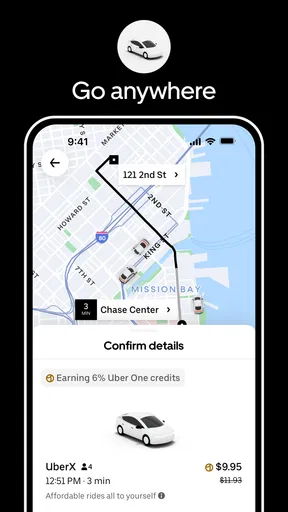
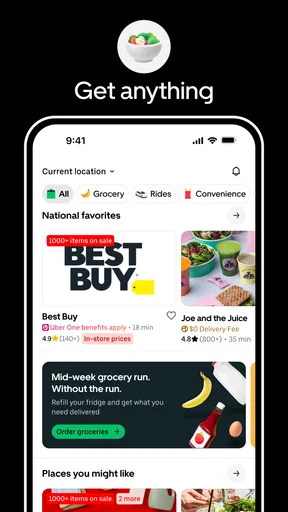
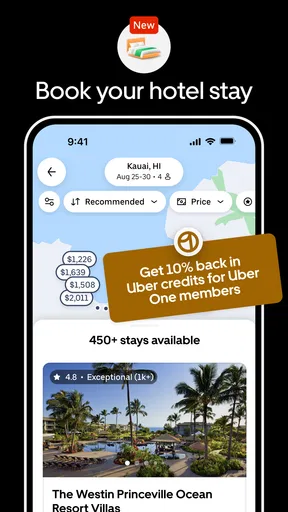
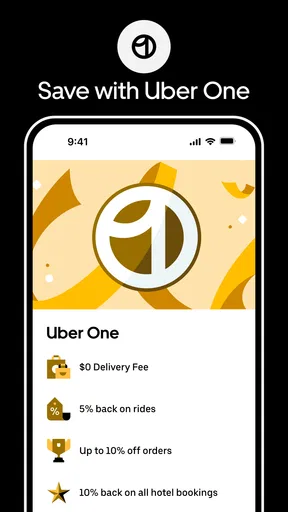
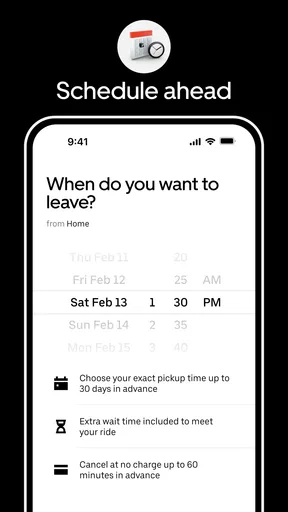
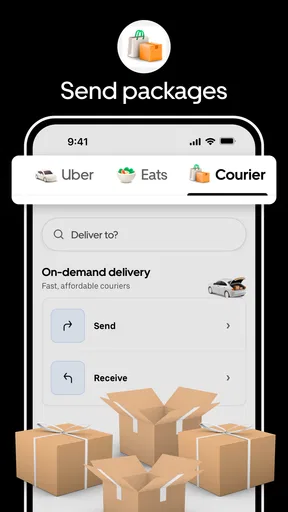
Our Review of Uber - Request a ride
 Analysis by Appyee
For a short trip across town, a late-night ride home, or the awkward last leg after a train journey, I want a car without having to negotiate every detail on the curb. That’s the everyday appeal of Uber - Request a ride: it puts ride requests in one place and gives you a way to follow the journey from pickup to drop-off. I find it most useful when public transport is inconvenient, though it is not automatically the cheapest or best choice for every trip.
What the free access is worth
Uber is a free app from Uber Technologies, Inc., in the Maps & Navigation category. That makes trying it a low-commitment decision: you can install the app without paying for the download. The rides themselves are a separate matter, so I would not confuse free access to the app with a free journey. The value depends on the ride you choose and the fare shown for your particular trip.
That distinction matters when deciding whether to keep it. If you use rideshare often, having the app ready can save time when you need a car quickly. If you rarely take paid rides, the free download may still be handy for occasional situations, but it does not make those trips cost nothing. I’d check the quoted fare before confirming, especially when plans are flexible and walking, transit, or another option could work just as well.
Where the convenience pays off
The main value I get is coordination. Instead of trying to find a cab, explain where I am, and estimate when it might arrive, I can request a ride through the app and watch the pickup progress. That can be especially useful when I’m carrying bags, traveling somewhere unfamiliar, or leaving at a time when buses and trains are less convenient. It also helps when I’m meeting someone: I can focus on the pickup point and timing rather than repeatedly sending updates.
Here’s a realistic example. I’ve got a suitcase, the weather has turned, and I need to get from a station to a hotel across town. I can enter the destination, review the available ride choice and the estimated fare, then decide whether the door-to-door convenience is worth it compared with waiting for a bus. If I proceed, tracking gives me a better sense of when the car will arrive. I still leave a little slack, because an estimate is not a promise, particularly when roads are busy.
Making a request with fewer surprises
A small habit makes the app more useful: check the pickup pin before requesting. At a busy station, airport, event venue, or large building, the place where you are standing may not be the easiest spot for a driver to reach. I take a moment to confirm the pickup location and look for a clear, safe place to meet. A correct destination is only half the job; a sensible pickup point can prevent confusion and avoidable waiting.
I also treat the fare estimate as a decision aid, not a guaranteed final answer. It helps me compare the ride with another way of getting there, but I look at the amount displayed before confirming rather than assuming every trip will cost roughly the same. When a trip is not urgent, waiting for conditions to settle or taking transit may make more sense. If I do need to leave immediately, I can weigh the convenience against the price with my eyes open.
For a group outing, the fare-splitting option can make the payment conversation less awkward. I’d agree on the plan with everyone before the ride rather than assume all friends want to share the cost in the same way. It is a useful convenience when the group is traveling together, but it does not replace a quick check that everyone understands the arrangement.
Your Ride, Your Way
Let’s dive right into the functionality of the Uber - Request a ride app. It’s pretty straightforward, really. You open the app, tap a few times, and voilà, a car is on its way to you. The interface is super user-friendly, making it easy to navigate even if you’re not a tech wizard. What I love about it is how it gives you the freedom to choose the type of ride you want. Fancy a luxury car? No problem. Need something budget-friendly? They've got you covered.
Features That Stand Out
The app offers some pretty cool features that make your ride experience smooth and enjoyable. For starters, the real-time tracking is a lifesaver. You can see exactly where your driver is and how long it’ll take for them to reach you. I also appreciate the fare estimator, which gives you a ballpark figure of what you’re going to pay before you even hop in the car. It’s like having a crystal ball for your wallet.
Another neat feature is the ability to split fares with friends. Gone are the days of awkwardly fumbling for cash or calculating who owes what. You simply tap a button, and everyone pays their share. Easy peasy.
Riding with Confidence
Now, let’s talk safety because I know it’s a top priority for many of us. Uber has built-in safety features that make you feel secure. You can share your trip details with someone you trust, so they know exactly where you are. Plus, Uber screens their drivers and allows riders to rate them, which keeps everyone on their best behavior. It’s comforting to know that the app prioritizes your safety.
I see those tools as helpful layers, not a reason to stop paying attention. Before getting into a car, I check that the ride details match what I requested, and I use the trip-sharing option when someone is waiting to know I’ve arrived. Those simple steps fit naturally into a pickup routine. If something about the meeting point or ride does not feel right, I would rather pause and reassess than treat the app’s convenience as a substitute for my own judgment.
A Few Bumps in the Road
Of course, no app is perfect, and Uber is no exception. Sometimes, the estimated arrival times can be a bit off, especially during peak hours. It’s not a deal-breaker, but it’s something to keep in mind if you’re in a rush. Also, surge pricing can be a bit of a shocker if you’re not expecting it. It’s a love-hate relationship, really. You love the convenience but hate when the prices surge.
That is why I would not rely on an estimated pickup time when a missed connection or appointment would be costly. I compare the time shown with the actual urgency of the trip and build in a buffer where I can. At airports and other crowded places, pickup logistics can also take attention: locating a meeting point and getting there with luggage may be less effortless than tapping the request button suggests. For a straightforward trip, that friction is manageable; under pressure, it is worth planning for.
How it compares with other ways to travel
Compared with hailing a taxi, a rideshare request can make it easier to arrange a pickup and follow its progress in one app. A street cab may be simpler if one is already available where you are, so I would not open Uber automatically when a suitable taxi is right in front of me. Compared with public transport, a car offers a more direct trip and can be easier with luggage or several stops, while a bus or train is often the better first check when cost matters more than door-to-door convenience.
For airport travel, I find the useful question is not simply “Can I get a ride?” but “Is this the right point in the journey to pay for one?” A car can help with bags or an inconvenient departure time, yet the pickup area, traffic, and fare still affect the decision. I would compare the quoted ride with the airport’s transit options and any available taxi before committing. Uber is strongest when the convenience solves a real problem, not just because it is already on my phone.
Who will get the most from it
I’d recommend keeping the app if you regularly travel in places where rides are available and value a planned pickup, trip tracking, or a direct route. It can be especially practical for visitors unfamiliar with local streets, people carrying luggage, and groups who want a shared ride rather than coordinating several separate journeys. Its rating and scale also suggest broad adoption: it has a 4.7 average from around 19 million ratings, with over a billion installs.
On the other hand, I would skip relying on it as a daily default if you are trying to minimize transport spending, already have dependable transit, or need an arrival time that cannot tolerate traffic uncertainty. A free app is easy to try, but frequent paid rides can add up. The app is rated for Everyone, yet the person arranging a trip should still consider the needs and comfort of anyone traveling with them, especially when coordinating a group or a pickup in an unfamiliar place.
My verdict on keeping it
Uber has been around since Oct 28, 2010, and its appeal is easy to understand: it brings requesting and tracking a ride into a familiar mobile workflow. The strongest reason to install it is not that every ride is a bargain, but that the app can reduce the uncertainty of arranging a car when a car is genuinely the most useful option. For me, that makes it a practical backup even if I do not choose it for every journey.
So, should you try it? I would, if you sometimes need rideshare or taxi options and want to check a fare and pickup before deciding. I would not treat it as a replacement for comparing transit, walking, or a nearby cab, nor assume the displayed arrival estimate will hold in busy conditions. Used selectively, Uber - Request a ride earns its place as a convenient travel tool; the best value comes from choosing it when its convenience is worth the fare.
Privacy and Permissions
See what permissions an app requests and how it handles your data.
- Identity
- find accounts on the device, add or remove accounts
- Contacts
- find accounts on the device, read your contacts
- Location
- approximate location (network-based), precise location (GPS and network-based)
- Phone
- directly call phone numbers, read phone status and identity
- Photos/Media/Files
- read the contents of your USB storage, modify or delete the contents of your USB storage
- Storage
- read the contents of your USB storage, modify or delete the contents of your USB storage
- Camera
- take pictures and videos
- Microphone
- record audio
- Wi-Fi connection information
- view Wi-Fi connections
- Device ID & call information
- read phone status and identity
- Other
- view network connections, pair with Bluetooth devices, access Bluetooth settings, change network connectivity, full network access, change your audio settings, run at startup, draw over other apps, use accounts on the device, control vibration, prevent device from sleeping, read Google service configuration
Verdict
Strengths of Uber - Request a ride
- Easy-to-use interface for quick ride requests.
- Wide availability in many cities worldwide.
- Cashless payments for added convenience.
- Real-time tracking ensures rider safety.
- Variety of vehicle options to choose from.
Limitations of Uber - Request a ride
- Surge pricing can lead to expensive fares.
- Driver availability may vary in rural areas.
- App occasionally experiences glitches.
- Customer support can be slow to respond.
- Limited options for ride customization.
Other Releases by Uber Technologies, Inc.
View All
Uber - Driver: Drive & Deliver
Business4.6

Uber Eats: Food and Grocery
Food & Drink4.6

Postmates - Food Delivery
Food & Drink4.5
Similar Picks in This Category
View All

inDrive. Rides with fair fares
® SUOL INNOVATIONS LTD4.8

Yandex Go: Taxi Food Delivery
Mikromobilnost LLC Belgrade4.8

Bolt: Request a Ride
Bolt Technology4.8

Rapido: Bike-Taxi, Auto & Cabs
Rapido Bike Taxi4.8

Yandex Maps and Navigator
Direct Cursus Computer Systems Trading LLC4.0
You May Also Like
View All
Frequently Asked Questions
How does Uber work and what do I need to get started?
Uber is a ride-hailing app that connects riders with nearby drivers through a smartphone interface. To get started, download the app on your Android or iOS device, create an account, and add a payment method. Once set up, you can request a ride by entering your destination and choosing a ride option that suits your needs.
Is Uber available in my city and how can I check?
Uber operates in numerous cities worldwide. To check if it's available in your area, visit the Uber website or open the app, which will automatically detect your location. You can also enter a specific city name on the website to see the service availability and the types of rides offered there.
How does Uber ensure safety for its riders and drivers?
Uber implements several safety measures, such as driver background checks, GPS tracking for every ride, and the ability to share trip details with friends or family. The app also includes emergency assistance features and a two-way rating system that helps maintain quality and safety standards for both riders and drivers.
What are the different ride options available on Uber?
Uber offers various ride options to cater to different needs and budgets. Options may include UberX for affordable everyday rides, UberPool for shared rides, UberXL for larger groups, and luxury options like UberBlack. Availability of these options can vary by city, so check the app for specifics in your area.
How do Uber's fare estimates and pricing work?
Uber's pricing is dynamic and can vary based on factors like time of day, demand, and traffic conditions. The app provides a fare estimate before confirming a ride, which includes base fare, distance, and time. Surge pricing may apply during peak times, increasing the cost. Users can see the estimated fare range and decide whether to book.
